Got a tracking number? Let’s see where your freight is


If you move freight from factory to water to shelf, you know this: containers rarely disappear. The information does, especially when you track sea freight across multiple carriers and ports.
Ships slip, terminals change cut-offs, holds land late, and fees arrive weeks after delivery. The problem is not just delays. It is not having one trusted view of each container’s lifecycle, and knowing which ones need attention today.
This article is for importers and exporters working with multiple forwarders and carriers. It explains container tracking end to end, from empty release to empty return, why portals and spreadsheets break at scale, and how to shift to real-time, carrier-agnostic tracking with less manual chasing.
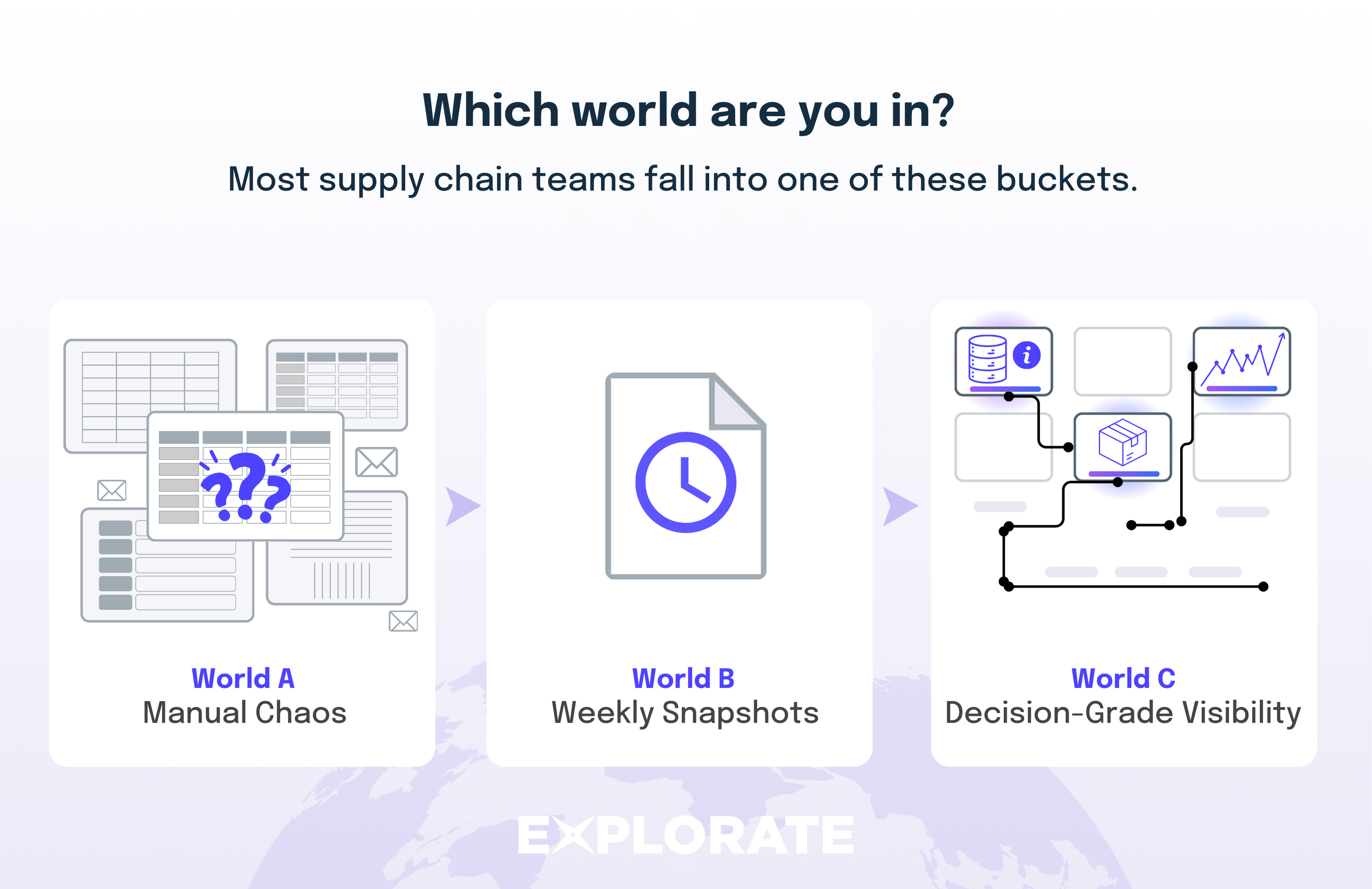
Most teams live in one of three worlds.

A real-time platform like Explorate is essentially a shipping container tracker that lets you track container numbers and exceptions in one place instead of running a container search across a dozen portals.
Figuring out which bucket you fall into:
Are you in World A, B, or close to C?
Container tracking works by joining up physical events in the container’s lifecycle (empty release, gate in, loaded, discharged, delivered, empty return) with digital events from carriers, terminals, AIS (Automatic Identification System) vessel positions, forwarders and your own PO or order data.
A modern platform standardises all those events into one timeline, then uses that timeline to predict estimated time of arrival (ETA) and flag exceptions before they turn into missed DIFOT or extra charges. This is true whether you’re doing simple container number tracking or full sea freight tracking for hundreds of boxes.
Definition:
Container tracking is being able to see where each container is, what’s happening to it right now, and which ones are likely to run late or rack up extra cost across all forwarders and carriers early enough to act. Practically, it’s tracking the container end to end, from empty release to empty return, not just watching a container number while it’s on the water.
So container tracking isn’t a pretty vessel map. It’s a decision grade stream of events tied to the actual box your live answer to “what risk do we have on containers today, and what should we do about it?”
Write down the 5–10 questions your business must answer every day, such as:
Any tracking solution or container tracker you invest in should answer those questions in one or two clicks.
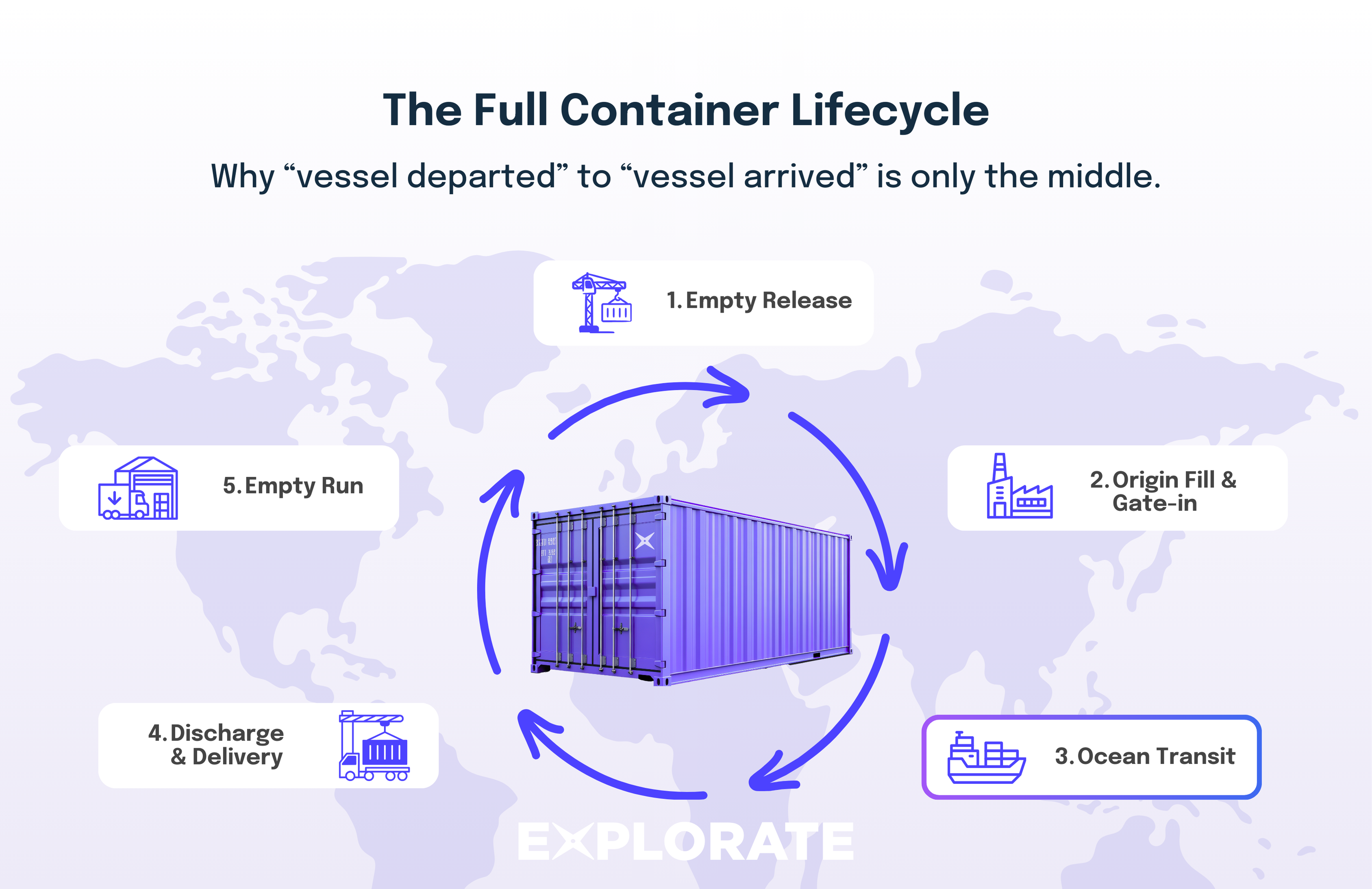
Most tracking conversations start at “vessel departed” and end at “vessel arrived”. That’s only the middle. From a tracking perspective, a container’s lifecycle is a loop:
If you’re not tracking the full container loop, you’ll always have blind spots on cost and risk even if your sea freight tracking looks solid while the container is “on the water.”
This is where tracking gets messy and where a lot of teams first feel the pain of manual container searches and tracking everything in spreadsheets.
Before that gate-in scan, most data is self-reported by suppliers, forwarders and truckers in emails, phone calls or PDFs. That means:
Data confidence jumps once the terminal scans the container on entry and again when the vessel load is confirmed.
This is the longest, often most opaque part of the journey.
You rely mainly on two signals:
AIS is excellent for understanding where the ship really is and whether a schedule is slipping. But AIS only knows about ships, not your specific container. The vessel can sail on time while your box is still on the quay.
That’s why rolling and blanking still surprise teams:
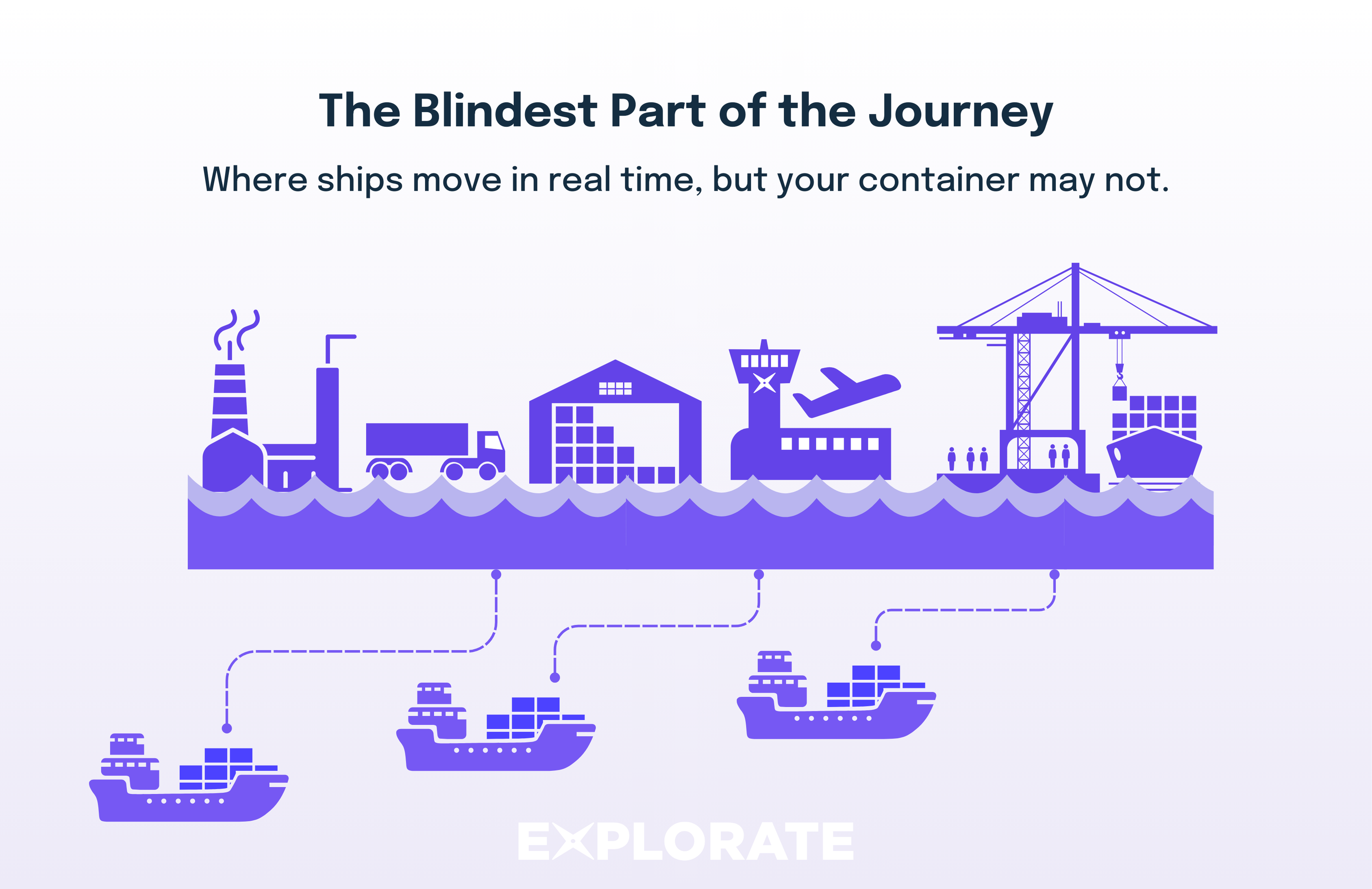
When your container transships through a hub (e.g. Singapore or Tanjung Pelepas):
This is exactly where relying on just one source, a carrier site, AIS app, or forwarder email is most likely to give you the wrong picture, especially when you’re checking container number status for a critical shipment.
Check if your current tracking view distinguishes between:
For your top 5 lanes, review a recent shipment with transshipment. How long did it take from actual transshipment to you seeing an update?
The destination leg is the final stage of a container’s journey, beginning when the vessel arrives at the destination port and ending when the container is delivered to the consignee or final warehouse. Tracking often feels more reliable in this stage because you are closer to the final milestone and terminals/depots typically generate clear “available”, “picked up”, and “empty returned” events. Even if the underlying data quality isn’t dramatically better, the shorter remaining lead time means ETA errors are usually measured in hours rather than days.
Two milestones matter more than most teams realise:
Definitions:
Detention is the fee you pay the shipping line when you keep their container outside the terminal beyond the allowed free time.
Demurrage is the fee you pay for your container sitting inside the terminal beyond free time (often referred to as wharf storage in Australian (AU) port context).
In many ports, free storage days at the terminal start when the container is made available for collection, not when the vessel arrives. How quickly you can actually pick it up then depends on slot availability, trucking capacity, and depot opening hours. Separately, detention (container hire) starts based on the carrier’s rules, so delays in this stage can quickly turn into extra cost.
Wharf storage from the terminal plus detention from the line is one of the fastest ways to destroy the margin on a shipment.
Empty parks and depot capacity can also cause problems. If a depot refuses empties or has long queue times:
Example: “Technically available”, practically invisible
A container into Sydney clears customs on Friday and is marked “available” that afternoon. Nobody noticed until Monday’s report. Free time started on Friday. By the time a truck is booked and the box is collected, you’ve burned multiple days of free time and started paying wharf storage.
Tracking accuracy is not constant. It rises and falls with custody changes.
The example below is based on a typical FCL import workflow, where the buyer is receiving the container at destination. Export flows look different in terms of who controls each leg and who can see which events, but the same pattern of confidence rising and falling still applies.
ℹ️ A note on Incoterms:
The Incoterm you buy on changes who owns the tracking data and when you see it. On C-terms (e.g. CFR, CIF, CPT, CIP), you often get fewer and later updates on the origin side because you rely on the supplier’s forwarder to pass information on. On F-terms or EXW, your own forwarder usually controls the main carriage and can provide more frequent, direct updates from origin through to destination.
Good tracking doesn’t pretend all data is equally reliable. It shows you clearly where events are verified (scans, releases, gate moves) and where they are inferred (e.g. “likely rolled”, “ETA adjusted based on drift”).
Every shipment involves a web of parties. Each one sees a slice.
Carrier portals
Forwarder updates
AIS-only apps
Terminal feeds
If you rely on just one of these:
Modern visibility is about cross-checking these views, resolving conflicts and surfacing the truth. The right shipping container tracker will pull all of these into one place so you don’t have to run a manual container search every time someone asks you to track container number XYZU1234567.
Under the hood, most modern platforms (including Explorate) do three simple but powerful things. Think of them as your digital container tracker for tracking shipping containers end to end.
All those disconnected updates land in one place instead of ten different inboxes and spreadsheets. This is where container number tracking, sea freight tracking and exception management finally come together.
Supply chain data is full of synonyms:
If you don’t standardise, you can’t compare performance across carriers or lanes.
The platform maps all of that to a clean, consistent milestone set, such as:
Definition:
Normalisation is the process of converting messy, carrier-specific events into a standard set of milestones your team understands and reports on.
Once events are standardised and stitched into a timeline, the system can:
You don’t need to be technical to use this. You just need a clear set of rules for what should be flagged and when. That’s the difference between a basic “track container” view and a true shipping container tracker that drives action.
Use something like this with your team:
With a platform like Explorate, the system surfaces the problem containers; your team decides what to do. You move from manual container search to structured exception handling.
Spreadsheet tracking is fine, until you hit a certain scale:
At that point, “just one more tab” stops working. Container tracking becomes too big to manage with ad-hoc container number tracking and manual “track container” checks.
Here’s a practical way to move towards World C.
For one high-volume lane (say Ningbo → Brisbane):
You’ll quickly see where you are blind or relying on one person’s memory.
Agree a standard naming convention:
Once you have this, you can ask a platform like Explorate to map carrier-specific events into your language. At that point you’ve effectively built your own container tracking and trace model for every shipment.
Don’t boil the ocean.
Example: Before vs after (simplified)
Real-time tracking only creates value if it feeds your existing systems and rhythms:
Container tracking is not a dot on a map. It’s a lifecycle view and a confidence engine.
It works when you:
Freight costs usually blow out because of unpredictability, like rolled containers, missed windows, and surprise fees, not because the base linehaul rate is high. Once you see that, moving from spreadsheets and weekly PDFs to real time visibility stops being a mystery. It becomes a deliberate capability you build using a container tracker that gives you reliable tracking in Australia and beyond.
If you want to see what that looks like across all your forwarders and carriers, book a short demo with the Explorate team and we’ll show you how to set up end to end container tracking on your next shipment.
Yes. Carrier portals remain a source of truth, but you shouldn’t have to live in them. A platform like Explorate pulls key events out of those portals and consolidates them, so you only log in directly when you need to dig into a specific issue or perform a one-off container search or track container number check.
The physical lifecycle is similar, but your responsibility and visibility shift.
Your shipping container tracking should reflect where you carry risk and how you track a container through each stage.
No system can guarantee exact dates, but combining AIS, carrier schedules and historical performance is far more accurate than relying on published dates alone. The real value is not a perfect ETA, but early warning when that ETA moves so you can act.
You can apply the same principles (end-to-end milestones and multiple data sources), but the events and parties differ.
A good platform supports all three with the right milestones, so you can track FCL, LCL, and air in one shipping container tracker instead of juggling separate tools for each.
It depends on where you’re starting from, but teams that shift from reactive spreadsheets to proactive, event-driven tracking often see solid double-digit percentage improvements. A lot of that comes just from spotting “available” containers earlier and getting empties back to depot on time.
No. Container tracking should complement those systems, not compete with them. Think of it as the live, external event feed that your ERP/TMS is missing today: a container tracker that keeps your core systems in sync with what’s actually happening on the ground and at sea.
.png)
No spam. Just the latest market news, tips, and interesting articles in your inbox.
